Inventory Planning Tool
Decision workspace for inventory planners and category managers
The system flags what needs attention; the planner decides, and it's logged.
Brought in when the path is unclear, teams disagree, or the data isn't driving decisions.
Trusted by teams at












Each one was built to test a direction before teams committed to it. Click any screen to open it.
Decision workspace for inventory planners and category managers
The system flags what needs attention; the planner decides, and it's logged.
Persona-based digital workplace for field and service leaders
Helped cut time-to-resolution 12% and field incidents 25% for ~3,000 users.
Decision-support tool for radio programming teams
Collapsed six source-named tabs into one decision screen.
Most engagements start with a reframing session. Some problems really are complicated, and I'd rather build something that holds up in the real environment than hand over a tidy framework that doesn't.
→ A CI team spent 6-7 months generating AI ideas. The actual question was which workflows mattered. Five capabilities, mapped to real workflows, later reused in a live pharma pitch.
When teams are stuck, I map back to the last point of real agreement. That's usually where the work starts.
→ Every inventory planner worked from their own Excel copy of one shared report. SIPOC mapping and 11 interviews across 5 roles showed where the process broke between teams.
Lo-fi IA, design system, high-fidelity prototype, handed to engineering.
→ The inventory workspace went from discovery to a hi-fi Figma prototype covering 5 personas. In build now. The digital workplace shipped to about 3,000 users across North America.
I put them on the table before anyone discovers them late.
→ Full automation was possible on both platforms. I argued for keeping people on the final call instead. Slower, but planners actually use it.
I structure outputs so someone owns the call and the reasoning is on record.
→ The system runs the mechanical checks and flags what needs attention. The person decides. The override gets logged with a reason.
"James understood our brief and turned it into outstanding work. A great partner throughout, and the output became the foundation for a pivotal launch."
"Our brief and inputs became something we couldn't have scoped ourselves. A great partner through the whole process."
"James combines design thinking and storytelling with well-researched, succinct content. He can take a story and retell it through a value framework in a way that lands with impact, and he keeps building his digital, AI, and transformation consulting skills."
"Helped lead a stakeholder session that defined the requirements for our command center, giving us exactly the insights we were looking for."
"Earned praise from a client who doesn't give it easily."
"Steered a stalled proposal conversation and turned it around into a strong comeback."
"Stepped in at the last minute and shaped the visualization for a key presentation. Classic James doing what James does."
"James's work proves that what looks good, sells good."
"A great summary from James that built momentum on the proposal."
Click any project to expand the full case study in place.
A CI team was stuck 6-7 months with no shared filter for what to build.
What to prioritize first, based on actual CI workflows, not a wishlist of AI ideas.
Reframed the effort around real CI workflows instead of generating more AI ideas.
capabilities mapped to real workflows, reused in a live pharma pitch
A Competitive Intelligence team had lost credibility with clients. Internal AI solutions existed, but the team couldn't answer basic questions: who they were building for, which problems mattered most, and what was worth building vs. discarding. They had been stuck for 6-7 months.
Which AI-enabled CI capabilities should we prioritize first, based on real CI workflows and what already exists internally, and where are the true gaps?
I reframed the effort from generating AI ideas to creating a shared way to decide. Instead of starting with solutions, the work forced alignment around real CI user workflows, then mapped those workflows to existing internal AI capabilities and visible gaps.
The team started with AI features and worked backward. No shared filter for what to build or discard.
Real workflows became the decision filter, prioritizing a small set of meaningful use cases and discarding the rest.
AI moved from a vague expectation to a set of clear, defensible priorities.
Leaders decided across disconnected dashboards, spreadsheets, and reports scattered everywhere.
How to do that without removing human judgment from regulated decisions.
Grouped related KPIs so the number, the "so what," and the action lived in one place.
in direct operational savings, ~3,000 users onboarded across North America
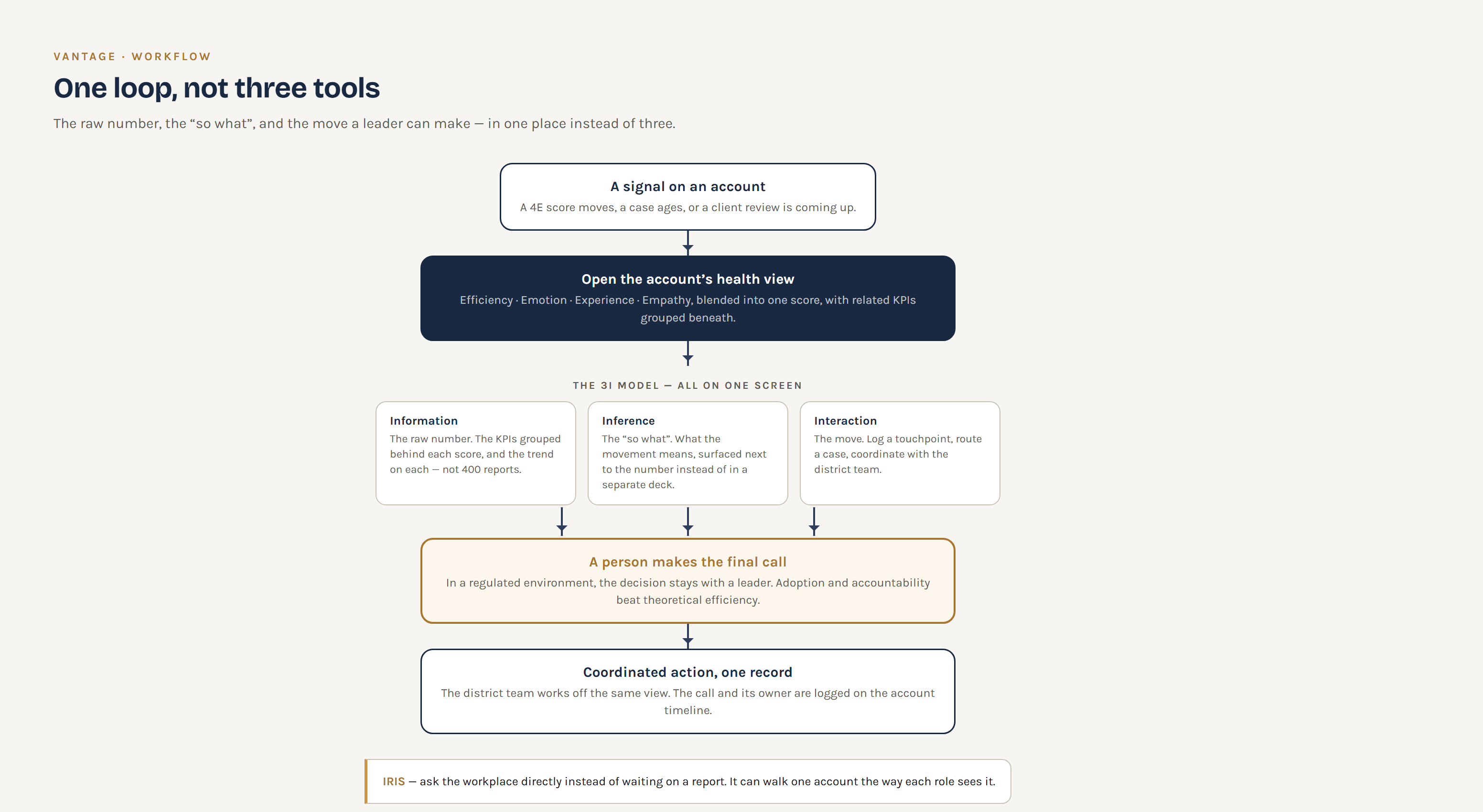
District and regional leaders were expected to make decisions across ~1,400 KPIs spread across disconnected dashboards, spreadsheets, and reports. The data existed. The structure to make sense of it didn't. A leadership change increased urgency to modernize how decisions were made, not just how data was stored.
How do we turn a data-heavy environment into a single place where leaders can understand what matters, coordinate with their teams, and take action; without removing human judgment in regulated decisions?
I defined the information architecture and UX structure of a persona-based digital workplace. Rather than exposing all data, I grouped and surfaced related KPIs together so the view was cohesive, navigable, and aligned to how leaders actually thought about their work. I helped implement my leadership's 3I model (information, inference, interaction) in the design, so the raw number, the "so what," and the action leaders could take all lived in one place instead of three.
I pushed to keep humans in the loop for final decisions, even where automation was possible, because adoption and accountability mattered more than theoretical efficiency in a regulated environment.
Leaders navigated spreadsheets, dashboards, and emails to piece together decisions. 1,321 KPIs across 400+ reports with no coherent structure.
A focused, scored view of performance, grouped by dimension so leaders could see where attention was needed.
This shifted the organization from reviewing data to making coordinated, accountable decisions at scale.
Planners worked from Excel copies of a shared report, coordinated by meetings and email, with no audit trail.
And which steps only look repetitive because the judgment inside them was never written down.
A rules engine, contextual insight, and an override that gets logged with a reason.
build in progress: discovery through a high-fidelity prototype, 5 personas deep
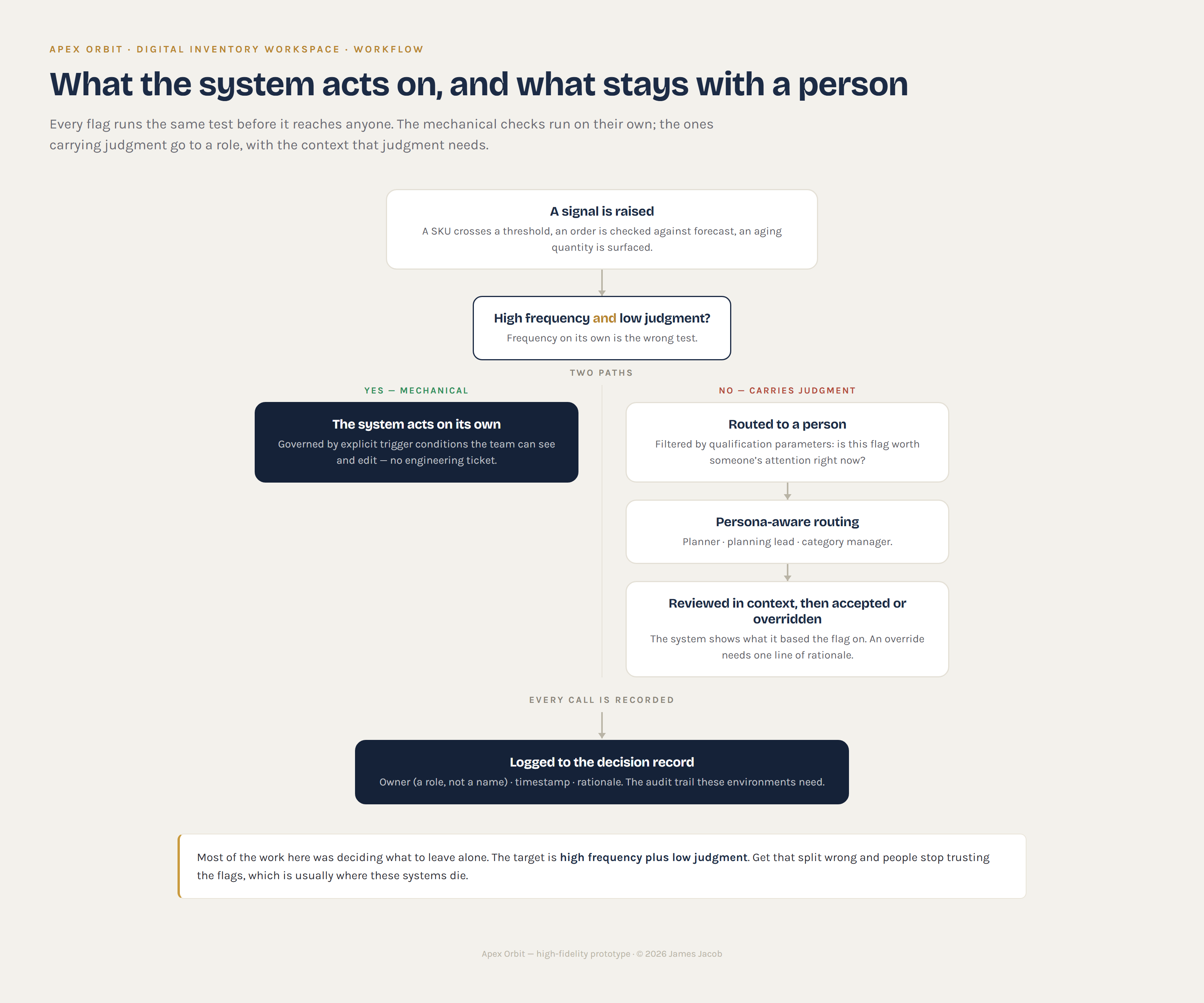
Inventory planners and category managers were making daily replenishment decisions without a shared source of truth. A single Power BI report was exported to Excel and manually filtered by each user, so everyone worked from a different version of the same data. Alignment happened through bi-daily meetings, Teams messages, and email chains with no audit trail.
The obvious answer was to automate the replenishment decision. It was also the fastest way to build something nobody would use.
Which parts of this workflow can the system act on by itself, and which ones only look repetitive because the judgment inside them was never written down?
I ran a discovery workshop using SIPOC to map inputs, outputs, and handoffs across five roles, then conducted 11 to 12 stakeholder interviews to find where the process broke between teams.
What came out of that was a split. Some steps were genuinely mechanical: flagging a SKU that crossed a threshold, checking an order against forecast, surfacing an aging quantity. Others looked mechanical from the outside but carried judgment nobody had documented, like a planner overriding a reorder point because of a supplier relationship, or a category manager holding stock ahead of a promo that wasn't in the system yet.
I designed the workflow around that split, defining the trigger conditions for when the system acts on its own and the qualification parameters that decide whether a flag is worth a person's attention:
The system proposes, the planner decides, and the override gets logged with a reason.
I pushed to keep people on the final call even where full automation was technically possible. These users had built their own Excel logic over years and trusted it because they could see every step. A system that decided for them would have been faster, and would have been ignored.
Each user maintained their own filtered version of a shared report. Decisions were coordinated through meetings and email with no shared record or status visibility.
A connected workspace where the system runs the mechanical checks, flags what needs attention, and routes it to the right role. The person makes the call and the call is logged.
The real target is high frequency plus low judgment. Get that split wrong and people stop trusting the flags.
Each tab named after a data source. The screen that made a call was fifth of six.
And what happens to the five source-named tabs, and the queue nobody trusted, if it's the second.
If a screen doesn't move a call toward keep, expand, tweak, or drop, it's a drill-down.
source-named tabs collapsed into one decision screen
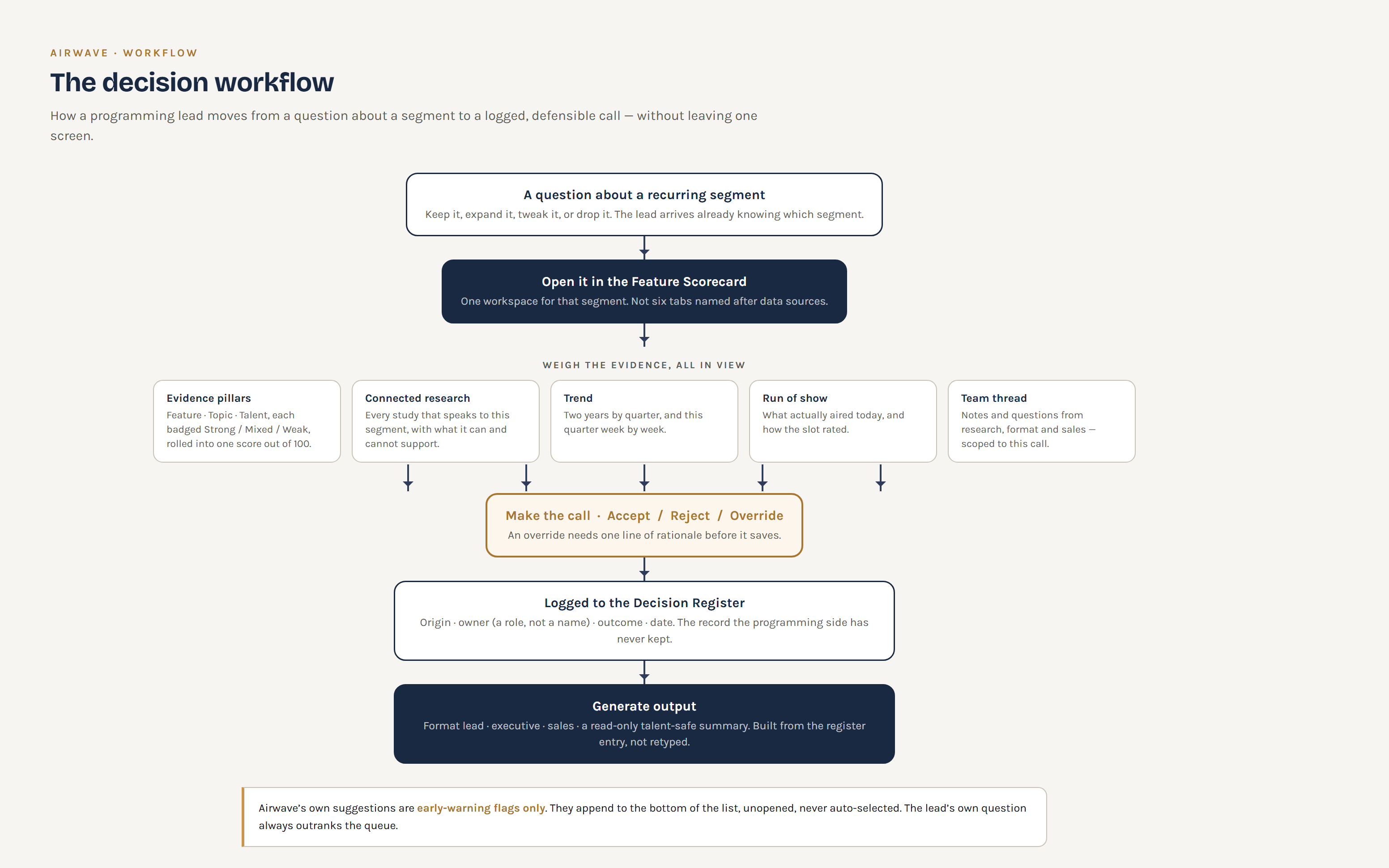
A media company was building a tool to help programming leaders decide what to do with recurring on-air features and topics: keep them, expand them, tweak them, or drop them. The working prototype had the right raw material: talent studies, feature tracking, topic rankers, dial tests, behavioral data. But it was organized as six tabs, each named after a data source. A program director had to already know which silo held their answer, and the one screen that actually started from a decision was fifth of six.
The evidence was all there. The tool just made you walk the entire data model to reach it.
Should the landing screen be a dataset or a decision? And if the answer is a decision, what happens to the five source-named tabs, the AI-first recommendation queue, and the confidence score nobody could explain?
I built a clean-room prototype around a single rule: every screen has to move a call toward keep, expand, tweak, or drop. If a screen doesn't serve one of those four verbs, it's a drill-down, not a destination.
The AI still proposes: early-warning flags append to the bottom of the list, unopened. The director's own question always outranks the queue.
Six tabs named after files. The decision screen was last, an AI queue set the agenda, and an unexplained confidence score got dragged down by data that structurally couldn't measure a segment.
One workspace per feature. The call, the evidence, the run of show and the team all in view at once, and every decision leaves an owner and a paper trail.
The good screen already existed. It just had to be the front door.
Also designed a range of visual work outside these case studies

I'm a design strategy lead who works at the point where product, data, and leadership disagree about what to build next. Most of that work isn't visual. It's diagnosing why a team is stuck, then building the framework that lets them decide and keep deciding.
Fifteen years across e-commerce and enterprise consulting, mostly in regulated or high-stakes environments where a bad decision is expensive and a slow one is worse. I started in market intelligence at Flipkart, one of Asia's largest e-commerce platforms, before moving into UX. Since 2015 I've been at C5i, moving through three phases: doing the data-to-insight translation myself, leading and mentoring a 12-person UX team that does it at scale, and now operating as an Experience Strategy Consultant brought in early to shape direction for large enterprise clients across healthcare, pharma, CPG, and technology. I hold an MBA from St. Joseph's Institute of Management and design thinking certifications from IBM and Google.
Based in Moncton, NB, Canada, working with clients across North America and Europe.
Working on something complex and unclear? That's usually where I'm most useful.